
Price History and Reference Price
Price history shows how the price of a product has developed, what the reference price is, and whether the offer you are running is actually below it. This is also where you retrieve the documentation if someone asks.
The page is included with the Smart-subscription. On lower plans, you will see the page with an information card instead of the numbers.
What the reference price is
The reference price — the "before price" — is the lowest price the product has had in the last 30 days. It is the price that should be struck through next to the offer price, and the rules for it come from the Omnibus Directive and the Marketing Act § 9a.
Two things are worth understanding:
- It is calculated for you. You should not set a "before price" manually. When an offer starts, the system retrieves the lowest price from the last 30 days and locks it.
- It is frozen while the offer is running. Your offer price does not become part of the calculation during the offer period, so the reference price does not decrease while you are running the offer.
An offer is valid when the offer price is below the reference price. If it is not, it is not a price reduction — and that is exactly what this page informs you about.
How to view the history for a product
- Go to Products → Offer Center → Price HistorySearch for the product in
- Search for a product
You can also come directly here from the price history icon in a row in "Adjust Offer", or by clicking a bar on the timeline.
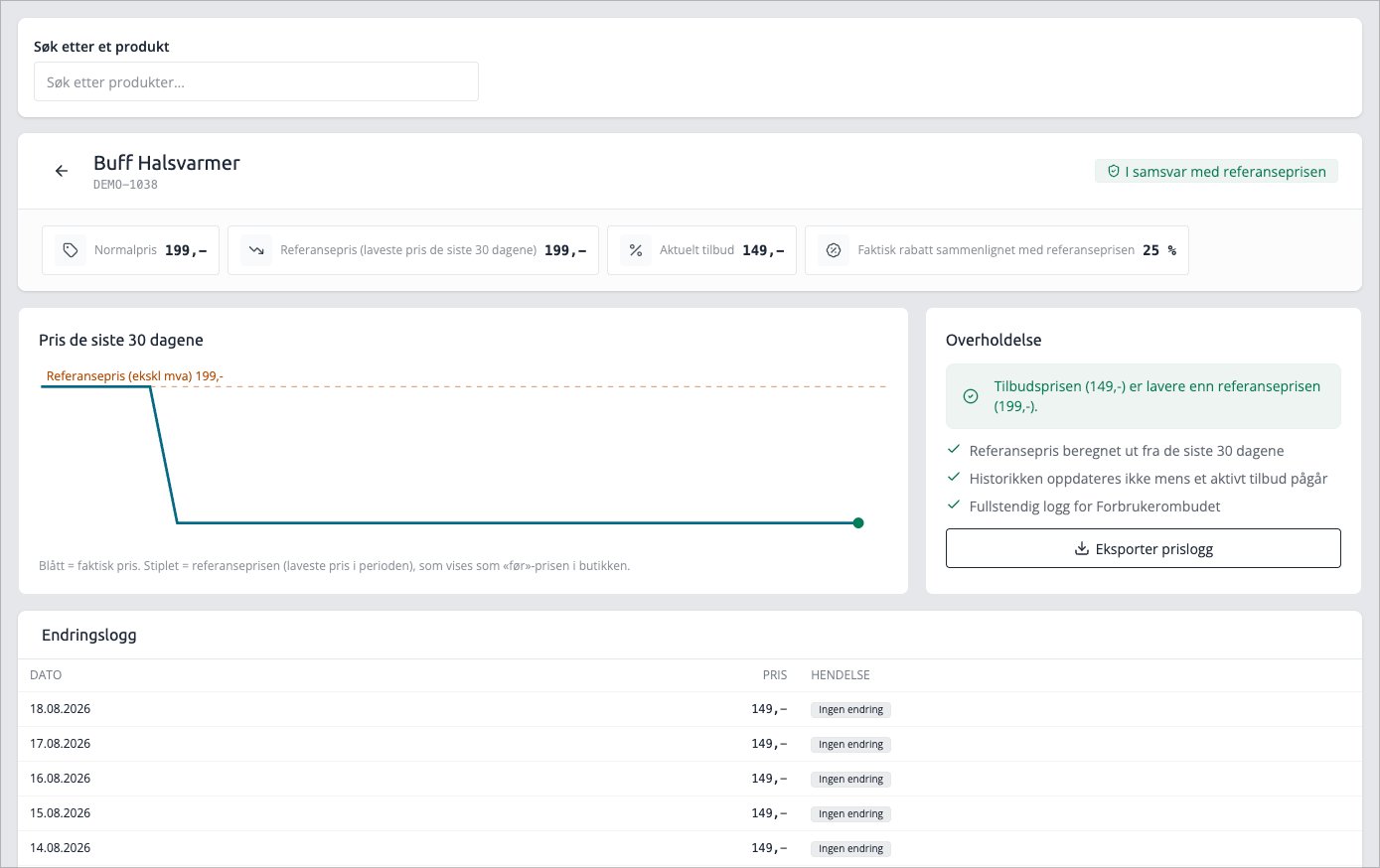
What you see
The graph
The price over the last 30 days. The blue line is the actual price. The dashed line is the reference price. If the blue line is below the dashed line, you are where you should be.
If the product has not had registered price changes in the last month, the graph will be empty. This simply means that the price has remained stable.
Key figures
Figure | What it is |
|---|---|
Normal price | The price the product usually sells for |
Reference price | Lowest price over the last 30 days — the "before" price |
Current offer | The price the customer pays now |
Actual discount | How much the offer price is below the reference price, in percentage |
Actual discount is the important one. The discount you entered is calculated from the normal price; the actual discount is calculated from the reference price, and that is what the customer actually receives. If the product has been on offer recently, the two figures are not the same.
Compliance
The card states directly whether the offer price is below the reference price. Green means it is. Yellow means it is not, and that the offer as it stands now is not a price reduction against the 'before' price.
The card also reminds you of the three premises: the reference price is calculated from the last 30 days, the history is not updated while an offer is ongoing, and the log below is complete.
Change Log
One row per day the price is registered, newest first, with date, event and price. The event is derived from what the price did compared to the day before:
Event | Means |
|---|---|
Price Registered | First registration in the period |
Price Decrease | Lower than previous registration |
Price Increase | Higher than previous registration |
No Change | Same price as previous registration |
The log shows prices, not people. It does not state who made the change — that information is not available in the price log.
Download the documentation
Click Export Price Log. The export runs in the background, so you can continue in the meantime, and appears under Recent Exports when it's ready. From there, click Download
The file is a CSV with date and price per row. The prices in the file are without VAT and use a period as the decimal separator, so they can be directly imported into spreadsheets and read by an auditor.
Tips
- If you run offers on the same product multiple times, check the price history between rounds. If you run offers consecutively, the reference price will be pushed down, and the «actual discount» will be less than what you think you are giving.
- Products marked to be excluded from reference price calculation never receive a reference price. In that case, the field remains empty, and that is intentional.
- If you are unsure whether an offer is legally compliant, the compliance card and a downloaded price log are what you need. Together, these two show both what the price was and what it is.