
Custom banner / ribbon
With this version of custom banner/ribbon, you can add a ribbon with optional text, color, and icon to each product. The ribbon will then be displayed on product boxes and the product page.
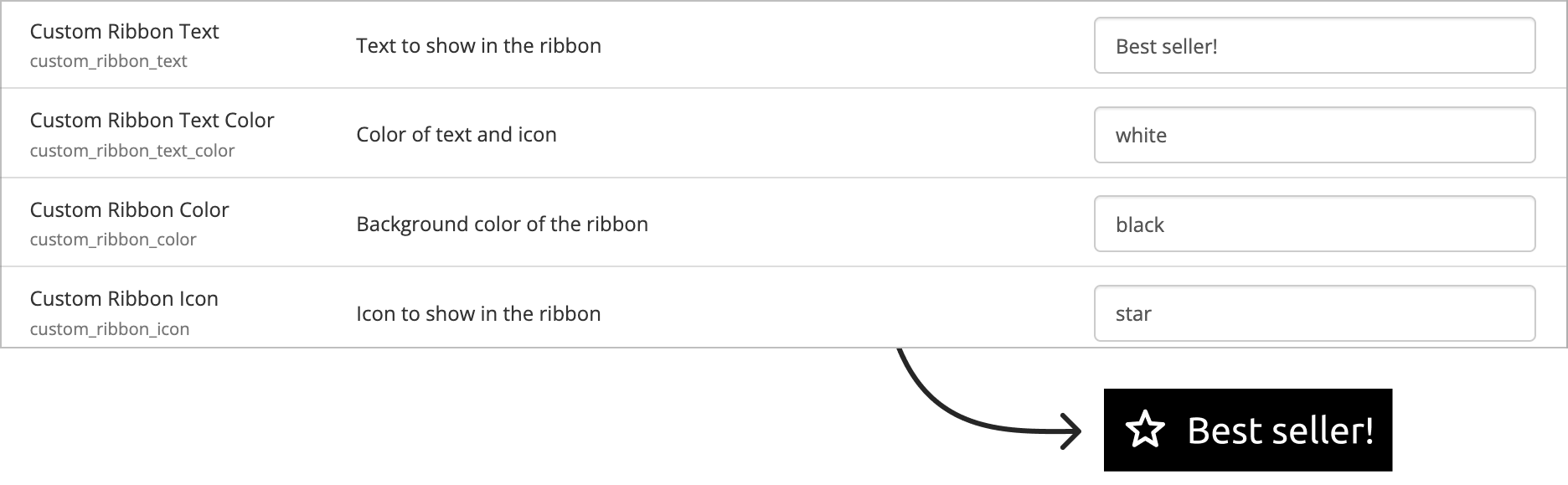
After activation, the following tags are available on the product page in the control panel:
- custom_ribbon_text: Text displayed in the ribbon
- custom_ribbon_text_color: Color of text and icon in the ribbon
- custom_ribbon_color: Background color of the ribbon
- custom_ribbon_icon: Icon inside the ribbon
Color
Add the desired background color for the ribbon. You can use color names, HEX, and RGB.
For example:
- IndianRed
- #CD5C5C
- rgb(205, 92, 92)
Icon selection
With designs using the design builder only pre-defined icons can be used. See selection below.
Customization
The ribbon has no other design settings than the background color. However, it has many specific classes that make it easy to customize everything.
__custom_ribbon_text_pp- class specific for product pages__custom_ribbon_text_pb- class specific for product boxes__custom_ribbon_text- applies to both product boxes and product pages__custom_ribbon_icon- icons are placed in a <span> with this class, making it easy to target and customize the icon by using__custom_ribbon_icon > svgcustom_ribbon_text- applies to both product boxes and product pagesstar(icon name) - icon name class: the name of the icon will also be added as a class. This makes it possible to customize ribbons based on which icon they have.
By using these classes, you can customize ribbons and make each change very specific.
This example shows how border-radiusbackground-color and color are changed for ribbons on product boxes only if they have the 'star' class
.__custom_ribbon_text_pb.star {
  border-radius: 4px;
  background: black;
  color: white;
}
Available icons
The following icons are available for use. Use the name displayed below the icon.
star
star |
check
check |
fire
fire |
trophy
trophy |
hashtag
hashtag |
leaf
leaf |
globe
globe |
arrow-trend-up
arrow-trend-up |
moon
moon |
brain
brain |
package-plus
package-plus |
package
package |