
Google Tag Manager
How to connect Google Tag Manager to Acendy
- Retrieve the container ID from your Google Tag Manager account. It typically looks like this: GTM-XXXXXXX
- Log in to the control panel and go to “Configuration” then click on Google.
- Find Google Tag Manager and click on it.
- Paste the container ID into the “Tag Manager ID” field.
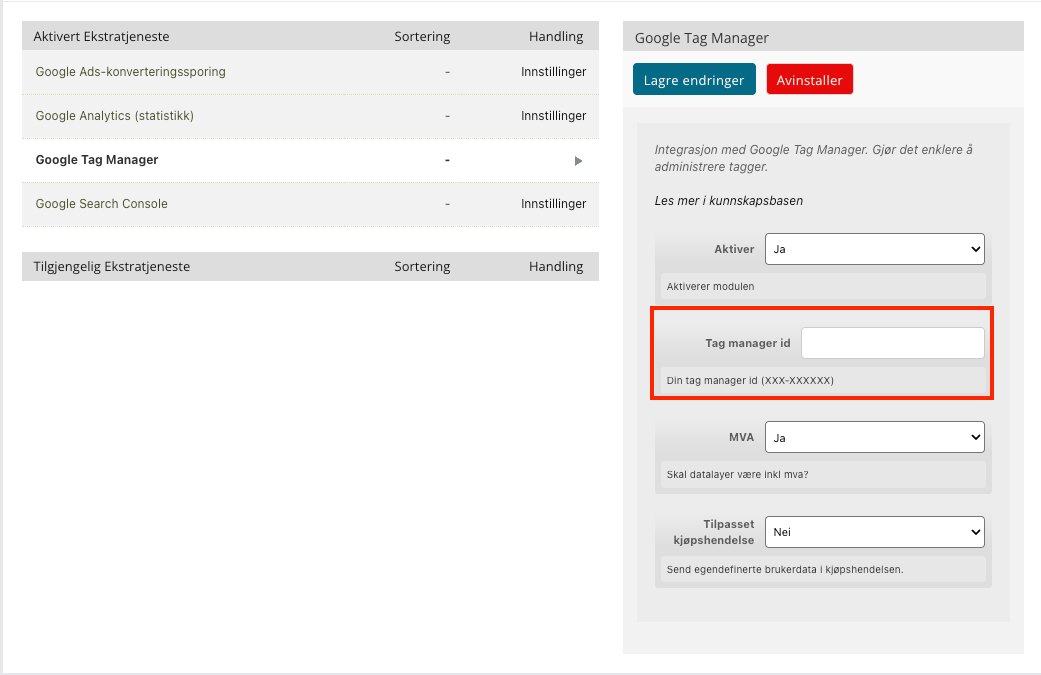
- Click Save.
What happens after connection?
Google Tag Manager is now activated on your online store, and you can manage tracking codes directly from Google Tag Manager.
Data Layer Variables - Overview
Below you will find a list of data layer variables along with detailed descriptions, which will help you customize your GTM configuration.
Data layer variable | Which data? |
eventModel.address.city | City name |
eventModel.address.country | Country |
eventModel.coupon | Discount coupon |
eventModel.currency | Currency |
eventModel.email | |
eventModel.address.first_name | First name |
eventModel.address.last_name | Last name |
eventModel.items | Product information (list) |
eventModel.phone_number | Phone number |
eventModel.address.postal_code | Postal code |
eventModel.shipping | Shipping cost |
eventModel.transaction_id | Transaction ID |
eventModel.value | Value for transaction |
eventModel.tax | Taxes for transaction |